> ## Documentation Index
> Fetch the complete documentation index at: https://docs.withflex.com/llms.txt
> Use this file to discover all available pages before exploring further.
# Get Insights Into HSA/FSA as a Channel
> Understand HSA/FSA payment trends and performance through the Flex Dashboard.
To manage HSA/FSA payments and view insights, visit the [Dashboard](https://dashboard.withflex.com/).
Flex provides all the tools you need to understand HSA/FSA as a channel. Through the Dashboard, you can manage your HSA/FSA payments, products, customers, subscriptions, and payment links. You can also export data for easy financial reconciliation.
If you're new to the Dashboard, you can watch a Loom walkthrough [here](https://www.loom.com/share/8d94a35a8b9540cca09e413e203bf64b).
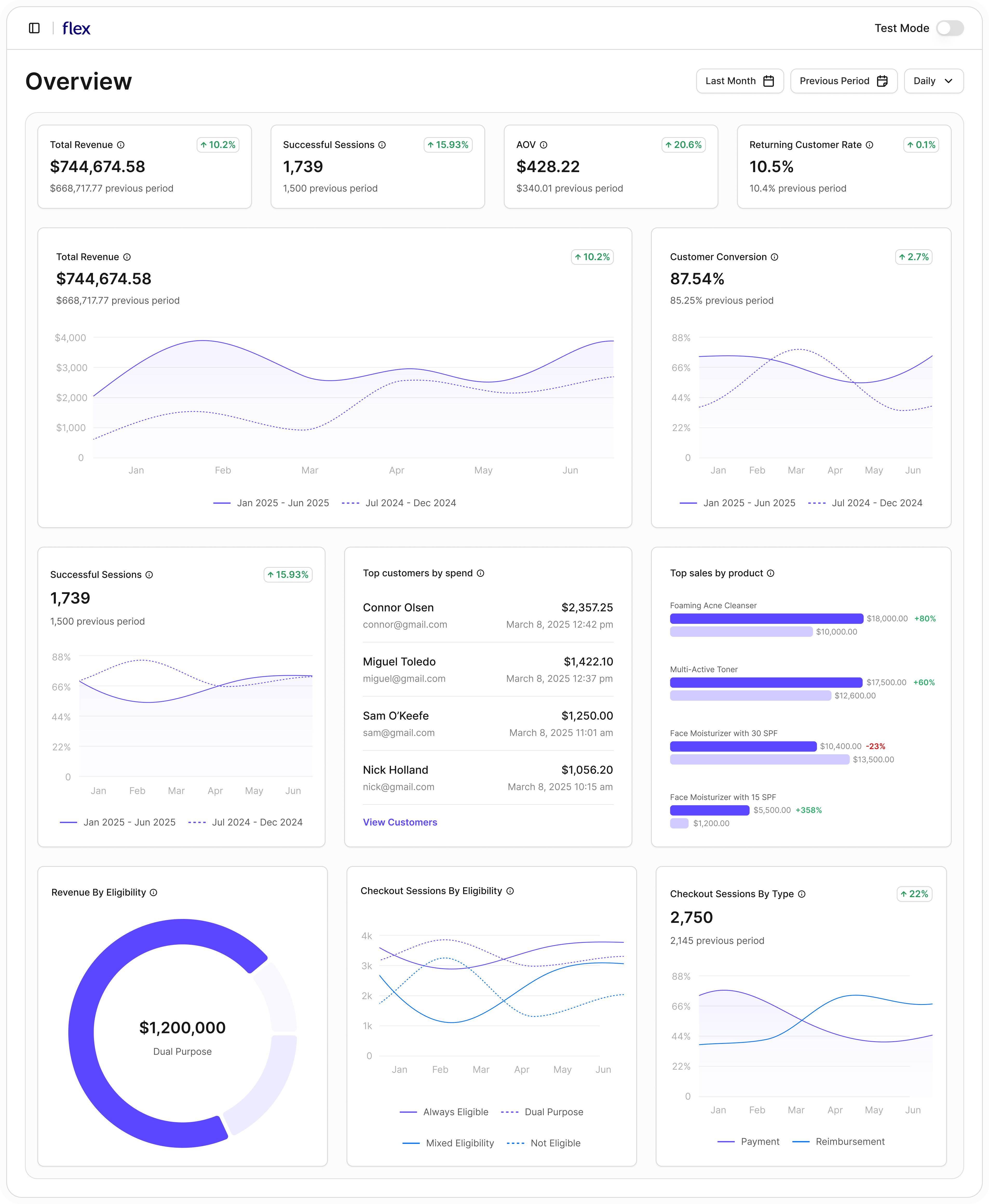
From the Overview page, adjust the date range to quickly see:
* Revenue, conversion, and checkout trends over time
* How this period compares to the previous period
* Your highest-spending Flex customers
* Your top-performing products on Flex
* How revenue and checkout sessions break down by eligibility
* How customers are completing purchases (direct payments vs reimbursements)