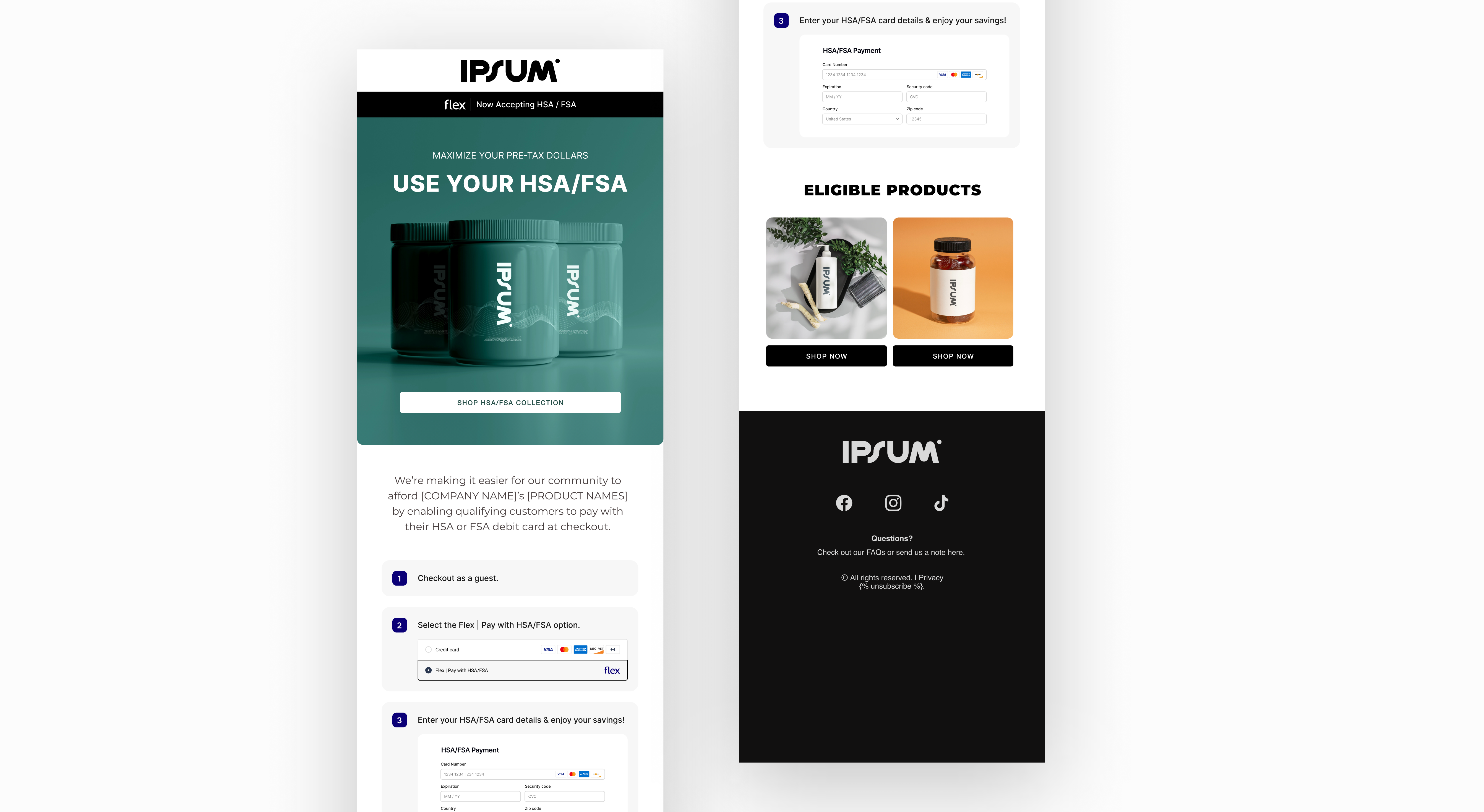
Duplicate and edit the Flex Email Templates Figma file here.
Email and SMS are your highest-leverage channels for HSA/FSA adoption — they reach customers who already know your brand and just need a reason to act. The sections below cover what to send at launch, how to weave Flex into ongoing flows, and ready-to-use copy for every touchpoint.

1. Launch Email

Launch email example
When to send: The day you enable Flex. This is your official announcement — send it to your full list.

What to communicate

  • You now accept HSA/FSA payments at checkout
  • Eligible products can be purchased with pre-tax dollars
  • Customers may save up to 30–40% depending on their tax rate
  • Checkout is simple — just select Flex

Subject lines
AngleSubject line
Benefit-ledYou can now use your HSA/FSA here
Savings-ledPay with HSA/FSA & save on eligible products
Action-ledUse pre-tax dollars on your purchase
Launch email template example

Templates

Choose the template that matches how your products are eligible.
Use this if your products are directly HSA/FSA eligible — no consultation required.
Subject: You can now pay with your HSA/FSA at [COMPANY NAME]

Headline: You Can Now Use Your HSA/FSA

Body:
We've partnered with Flex to make it easier to shop [PRODUCT NAME]
using your HSA or FSA card — no additional paperwork required.

That means you can use pre-tax dollars on qualifying purchases —
potentially saving up to 30–40% depending on your tax rate.

How it works:
1. Add eligible items to your cart
2. Choose Flex | Pay with HSA/FSA at checkout
3. Enter your HSA or FSA card to complete your purchase

[Insert image of checkout page]

CTA: Shop Now →

2. Evergreen & Lifecycle Email

When to use: After launch, Flex messaging should live inside your existing flows — not as standalone sends. A callout block or a single sentence is enough.

Where to add it

  • Welcome and onboarding emails
  • Product spotlight and new arrival announcements
  • Sale and bundle promotions
  • Post-purchase and replenishment flows

Copy blocks

Add either of these into any email where the product is eligible:
Option A:
HSA/FSA eligible — Use your pre-tax dollars and save up to 30–40%
on qualifying purchases.
 
Option B:
Eligible for HSA/FSA — Pay with pre-tax funds at checkout.

3. Triggered Emails

Triggered email example
Add Flex to flows you already have — don’t build new ones. These are the highest-converting touchpoints because the customer is already engaged.

Abandoned cart

Subject: Still thinking it over?
 
Body:
Don't forget — this item may be eligible for HSA/FSA payment.
Use pre-tax dollars at checkout and save up to 30–40%.
 
CTA: Complete your purchase →

Post-purchase education

Subject: Did you know?
 
Body:
Many of our products are HSA/FSA eligible.
Look for the eligibility badge on product pages next time you shop.
 
CTA: See eligible products →

Subscription reminder

Body:
Eligible subscriptions can also be paid with HSA/FSA funds.
Use your pre-tax dollars before they expire.
 
CTA: Manage your subscription →

4. SMS

Keep SMS short and lead with the benefit. One message, one action.

Launch

We now accept HSA/FSA payments with Flex. Use
pre-tax dollars on eligible products at checkout.
[link]

Savings-focused

Save up to 30–40% using your pre-tax HSA/FSA
funds on qualifying purchases. [link]

Product spotlight

This item may be HSA/FSA eligible. Shop now
and use your health funds at checkout. [link]

Abandoned cart

Still thinking it over? You can use HSA/FSA
funds on eligible products. [link]

Best practices

  • Send at least one standalone campaign to announce your launch with Flex
  • Add Flex to your welcome, post-purchase, and abandoned cart flows — even a single line makes a difference
  • Subject lines that name HSA/FSA directly outperform generic ones
  • Link to your landing page or eligible product collection — not your homepage
  • Use checkout screenshots or eligibility badges as visuals — they reduce friction and build trust