Learn how to view and manage customer information through the Flex Dashboard.
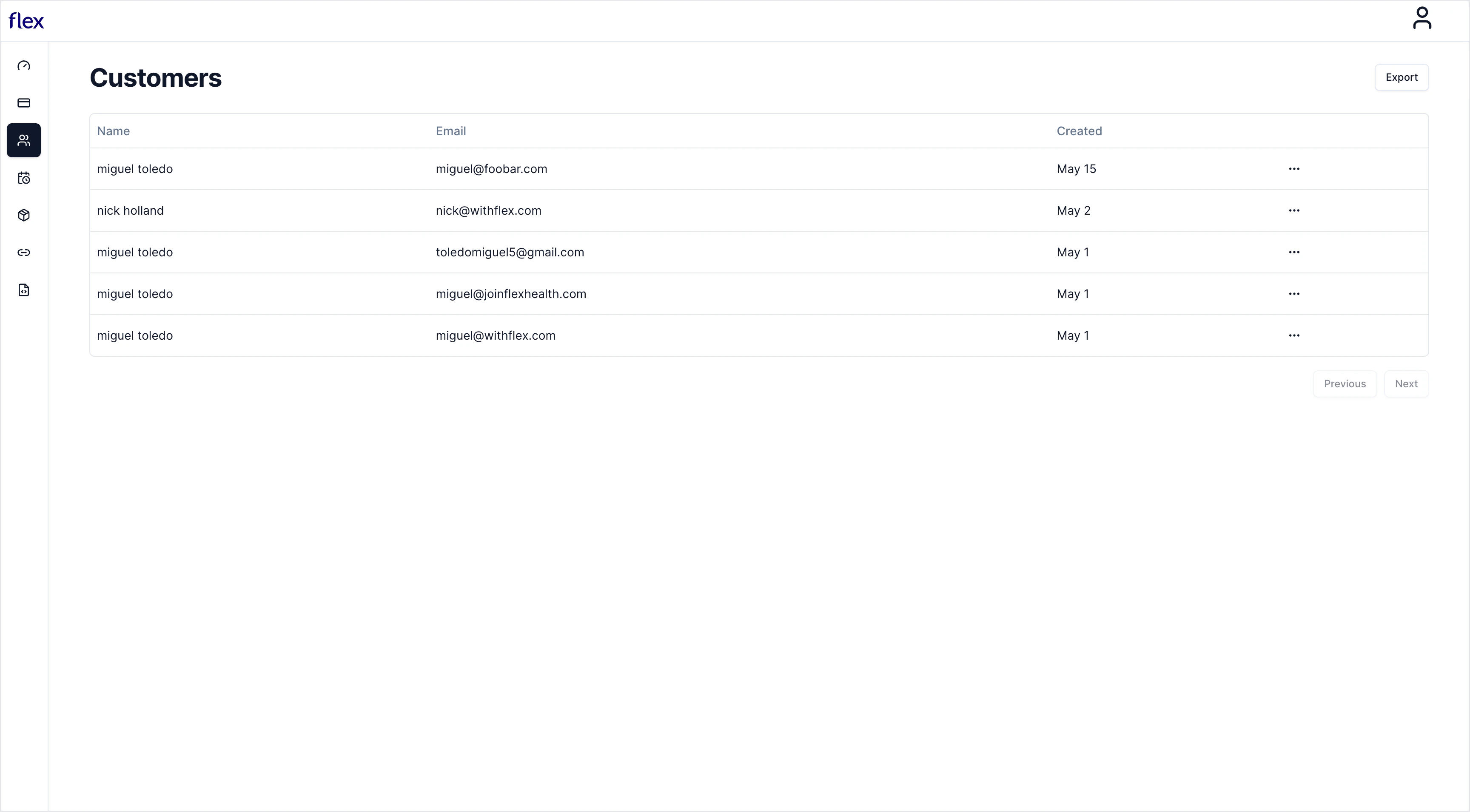
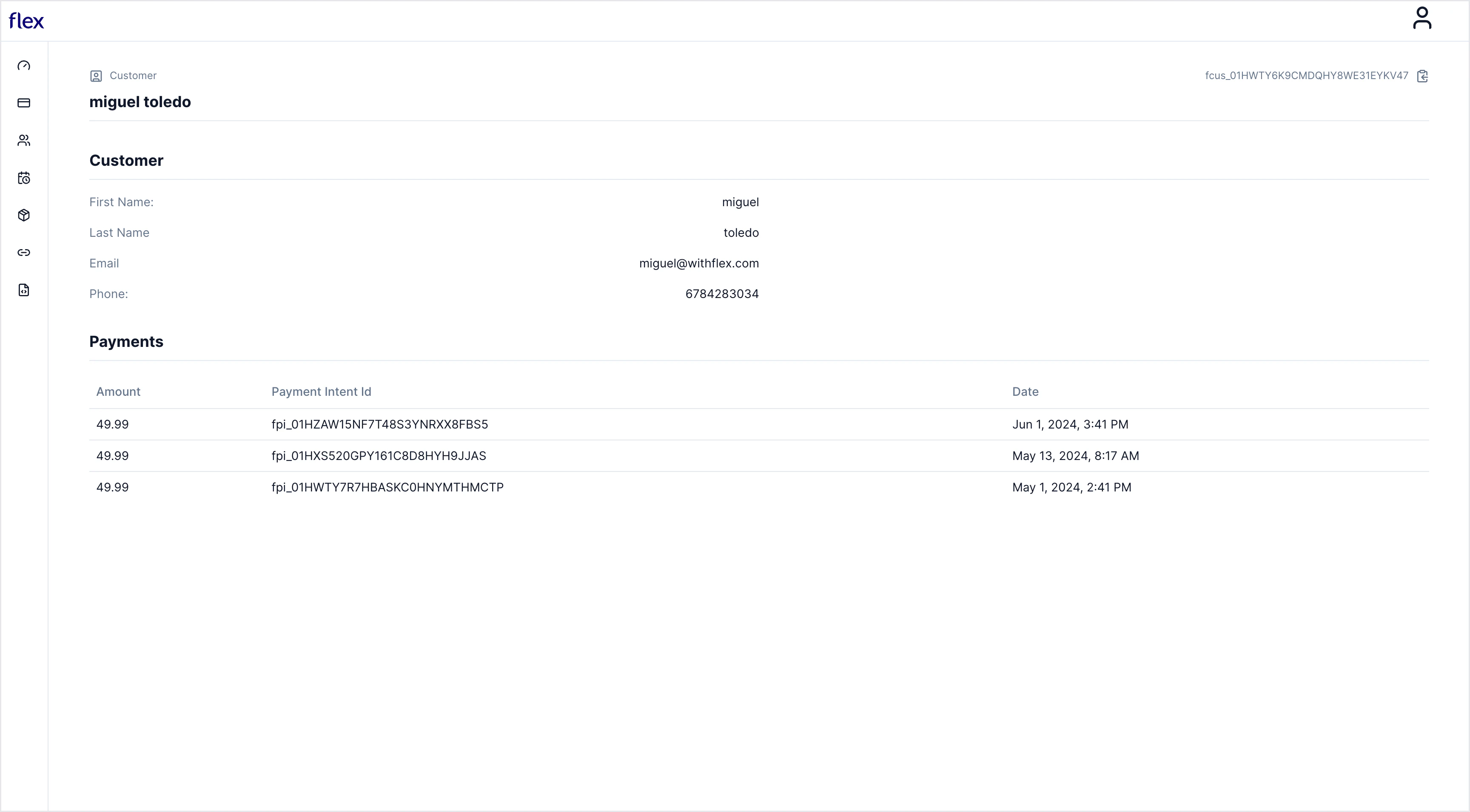
Navigate to Customers to view a list of all your customers. You can export customer data from this view if necessary.Click the three dots and select View Customer to see additional details about the customer, including all of their corresponding payments.
A customer may not have payments if they only reached the contact section of checkout but did not enter their payment information.
{"docsConfig":{"theme":"mint","$schema":"https://mintlify.com/docs.json","name":"Flex Documentation","colors":{"primary":"#0070FA","light":"#BAB3FF","dark":"#0B0077"},"logo":{"light":"https://mintcdn.com/flex-87/1kILreF5HcjIKLdi/logo/light.svg?fit=max\u0026auto=format\u0026n=1kILreF5HcjIKLdi\u0026q=85\u0026s=f703a75bc80df014f4849a7225b4879f","dark":"https://mintcdn.com/flex-87/1kILreF5HcjIKLdi/logo/dark.svg?fit=max\u0026auto=format\u0026n=1kILreF5HcjIKLdi\u0026q=85\u0026s=1aabf14d790c002d1740276fdbced9ab"},"favicon":"https://mintcdn.com/flex-87/liG_HQMgKKwndFp8/favicon.svg?fit=max\u0026auto=format\u0026n=liG_HQMgKKwndFp8\u0026q=85\u0026s=82a2993b4fffbf19268067f48e898bed","navbar":{"primary":{"type":"button","label":"Dashboard","href":"https://dashboard.withflex.com/"}},"footer":{"socials":{"github":"https://github.com/JoinFlexHealth","linkedin":"https://www.linkedin.com/company/withflex","x":"https://x.com/paywithflex","instagram":"https://www.instagram.com/paywithflex"}},"icons":{"library":"lucide"},"styling":{"eyebrows":"breadcrumbs","latex":true},"navigation":{"global":{"anchors":[{"anchor":"Status","icon":"wifi","href":"https://statuspage.incident.io/with-flex"},{"anchor":"Support","icon":"mail","href":"mailto:support@withflex.com"},{"anchor":"Website","icon":"laptop","href":"https://www.withflex.com"}]},"pages":[]}},"deployment":{"deploymentMetadataValue":{"subdomain":"flex-87","hasAudioNarration":false,"actualSubdomain":"flex-87","customDomains":["docs.withflex.com"],"gitSource":{"type":"github","owner":"joinflexhealth","repo":"flex","deployBranch":"main","contentDirectory":"flex-docs","isPrivate":true,"mountPath":"","label":""},"chroma":{"liveDeploymentHistoryId":"6ae374b5b3f002741c1ab41f","collectionId":"02d9944d-fd1b-4f89-a595-9c3890413440","schemaVersion":"v3","latestBuiltDeploymentHistoryId":"6ae374b5b3f002741c1ab41f"},"entitlements":{"AI_CHAT":{"status":"ENABLED"},"WEB_MCP":{"status":"ENABLED"},"NARRATION":{"status":"ENABLED"}},"buildId":"6aee6975cd3f5bf5212d16fd","clientVersion":"0.0.4076","searchFilterCounts":[{"language":"default","tag":"API Reference","count":188},{"language":"default","tag":"Guides","count":51},{"language":"default","tag":"Integration","count":29},{"language":"default","tag":"Marketing","count":21},{"language":"default","tag":"Checkout Sessions","count":13},{"language":"default","tag":"Subscriptions","count":12},{"language":"default","tag":"Products","count":9},{"language":"default","tag":"Disputes","count":8},{"language":"default","tag":"Shopify","count":7},{"language":"default","tag":"Overview","count":7}]},"assistantConfig":{},"basePath":"","hasChatPermissions":true,"hasWebMcpPermissions":true,"toggles":[{"name":"kill-isr","enabled":true,"variant":{"name":"disabled","enabled":false,"feature_enabled":true},"impressionData":false},{"name":"agent-mintlify-slack","enabled":true,"variant":{"name":"disabled","enabled":false,"feature_enabled":true},"impressionData":false},{"name":"agent-integrations-settings","enabled":true,"variant":{"name":"disabled","enabled":false,"feature_enabled":true},"impressionData":false},{"name":"rbac-expansion","enabled":true,"variant":{"name":"disabled","enabled":false,"feature_enabled":true},"impressionData":false},{"name":"automations-pr-grouping","enabled":true,"variant":{"name":"disabled","enabled":false,"feature_enabled":true},"impressionData":false},{"name":"custom-prefix","enabled":true,"variant":{"name":"disabled","enabled":false,"feature_enabled":true},"impressionData":false},{"name":"analytics-v7","enabled":true,"variant":{"name":"disabled","enabled":false,"feature_enabled":true},"impressionData":false},{"name":"user-flows-analytics","enabled":true,"variant":{"name":"disabled","enabled":false,"feature_enabled":true},"impressionData":false},{"name":"no-publish-flow","enabled":true,"variant":{"name":"disabled","enabled":false,"feature_enabled":true},"impressionData":false},{"name":"workos-onboarding","enabled":true,"variant":{"name":"disabled","enabled":false,"feature_enabled":true},"impressionData":false},{"name":"llms-txt-v2","enabled":true,"variant":{"name":"disabled","enabled":false,"feature_enabled":true},"impressionData":false},{"name":"snapshot-serving-live","enabled":true,"variant":{"name":"disabled","enabled":false,"feature_enabled":true},"impressionData":false},{"name":"stripTemperatureMiddleware","enabled":true,"variant":{"name":"disabled","enabled":false,"feature_enabled":true},"impressionData":false},{"name":"support-platform-pylon-zendesk","enabled":true,"variant":{"name":"disabled","enabled":false,"feature_enabled":true},"impressionData":false},{"name":"snapshot-serving","enabled":true,"variant":{"name":"disabled","enabled":false,"feature_enabled":true},"impressionData":false},{"name":"instant-rollback","enabled":true,"variant":{"name":"disabled","enabled":false,"feature_enabled":true},"impressionData":false},{"name":"granular-notifications-server","enabled":true,"variant":{"name":"disabled","enabled":false,"feature_enabled":true},"impressionData":false},{"name":"granular-notifications","enabled":true,"variant":{"name":"disabled","enabled":false,"feature_enabled":true},"impressionData":false},{"name":"automations-fable","enabled":true,"variant":{"name":"disabled","enabled":false,"feature_enabled":true},"impressionData":false},{"name":"fixed-ai-action-pricing","enabled":true,"variant":{"name":"disabled","enabled":false,"feature_enabled":true},"impressionData":false},{"name":"automation-resolve-merge-conflict","enabled":true,"variant":{"name":"disabled","enabled":false,"feature_enabled":true},"impressionData":false},{"name":"scoped-publishing","enabled":true,"variant":{"name":"disabled","enabled":false,"feature_enabled":true},"impressionData":false},{"name":"mintql","enabled":true,"variant":{"name":"disabled","enabled":false,"feature_enabled":true},"impressionData":false},{"name":"page-level-analytics","enabled":true,"variant":{"name":"disabled","enabled":false,"feature_enabled":true},"impressionData":false},{"name":"editor-version-history-v2","enabled":true,"variant":{"name":"disabled","enabled":false,"feature_enabled":true},"impressionData":false},{"name":"billing-page-v2","enabled":true,"variant":{"name":"disabled","enabled":false,"feature_enabled":true},"impressionData":false},{"name":"full-page-search","enabled":true,"variant":{"name":"disabled","enabled":false,"feature_enabled":true},"impressionData":false},{"name":"workspace-projects","enabled":true,"variant":{"name":"disabled","enabled":false,"feature_enabled":true},"impressionData":false},{"name":"assistant-v5","enabled":true,"variant":{"name":"disabled","enabled":false,"feature_enabled":true},"impressionData":false},{"name":"fork-pr-previews","enabled":true,"variant":{"name":"disabled","enabled":false,"feature_enabled":true},"impressionData":false},{"name":"revalidation-jwt","enabled":true,"variant":{"name":"disabled","enabled":false,"feature_enabled":true},"impressionData":false},{"name":"workos-sso-scim","enabled":true,"variant":{"name":"disabled","enabled":false,"feature_enabled":true},"impressionData":false},{"name":"hobby-abuse-scan","enabled":true,"variant":{"name":"disabled","enabled":false,"feature_enabled":true},"impressionData":false},{"name":"dashboard-inbox","enabled":true,"variant":{"name":"disabled","enabled":false,"feature_enabled":true},"impressionData":false},{"name":"workos-signup","enabled":true,"variant":{"name":"disabled","enabled":false,"feature_enabled":true},"impressionData":false},{"name":"turbopuffer-dual-write","enabled":true,"variant":{"name":"disabled","enabled":false,"feature_enabled":true},"impressionData":false},{"name":"workos-enabled","enabled":true,"variant":{"name":"disabled","enabled":false,"feature_enabled":true},"impressionData":false},{"name":"approve-review-flow","enabled":true,"variant":{"name":"disabled","enabled":false,"feature_enabled":true},"impressionData":false},{"name":"editor-metadata","enabled":true,"variant":{"name":"disabled","enabled":false,"feature_enabled":true},"impressionData":false},{"name":"sso-setup-deadline-banner","enabled":true,"variant":{"name":"disabled","enabled":false,"feature_enabled":true},"impressionData":false},{"name":"turbopuffer-serve","enabled":true,"variant":{"name":"disabled","enabled":false,"feature_enabled":true},"impressionData":false},{"name":"live-agents","enabled":true,"variant":{"name":"disabled","enabled":false,"feature_enabled":true},"impressionData":false},{"name":"comment-mode","enabled":true,"variant":{"name":"disabled","enabled":false,"feature_enabled":true},"impressionData":false}],"googleFontsInlined":false},"customCss":[{"filePath":"style.css","content":"#topbar-cta-button span.bg-primary-dark{background-color:#0B0077!important}html.dark #topbar-cta-button span.bg-primary-dark{background-color:#BAB3FF1A!important;border-color:#BAB3FF;border-width:1px}main img,article img,.content img,[data-content] img{border:1px solid #E8EAED!important}main img.rounded,article img.rounded,.content img.rounded,[data-content] img.rounded{border:.5px solid #E8EAED!important}.nav-logo,img.nav-logo{border:none!important}.brand-logo-grid img{border:none!important}.doc-screenshot img{border:none!important}img.no-border{border:none!important}.nav-anchor:hover .mr-4.rounded-md.p-1.shadow-sm{background:rgba(17, 24, 39, 0.05)!important;background-color:rgba(17, 24, 39, 0.05)!important;color:#1f2937!important;--tw-ring-opacity: 1 !important;--tw-ring-offset-shadow: var(--tw-ring-inset) 0 0 0 var(--tw-ring-offset-width) var(--tw-ring-offset-color) !important;--tw-ring-shadow: var(--tw-ring-inset) 0 0 0 calc(1px + var(--tw-ring-offset-width)) var(--tw-ring-color) !important;box-shadow:var(--tw-ring-offset-shadow), var(--tw-ring-shadow), var(--tw-shadow)!important;filter:none!important}.dark .nav-anchor:hover .mr-4.rounded-md.p-1.shadow-sm{background:rgba(229, 231, 235, 0.05)!important;background-color:rgba(229, 231, 235, 0.05)!important;color:#d1d5db!important;--tw-ring-opacity: 1 !important;--tw-ring-offset-shadow: var(--tw-ring-inset) 0 0 0 var(--tw-ring-offset-width) var(--tw-ring-offset-color) !important;--tw-ring-shadow: var(--tw-ring-inset) 0 0 0 calc(1px + var(--tw-ring-offset-width)) var(--tw-ring-color) !important;box-shadow:var(--tw-ring-offset-shadow), var(--tw-ring-shadow), var(--tw-shadow)!important;filter:none!important}.group:hover .group-hover\\:ring-0{--tw-ring-opacity: 1 !important;--tw-ring-color: rgba(17, 24, 39, 0.05) !important}.dark .group:hover .group-hover\\:ring-0{--tw-ring-opacity: 1 !important;--tw-ring-color: rgba(55, 65, 81, 0.4) !important}.nav-anchor:hover .secondary-opacity.group-hover\\:fill-primary-dark.group-hover\\:bg-white{background-color:currentColor!important;fill:none!important}.nav-anchor:hover .secondary-opacity{background-color:#1f2937!important}.dark .nav-anchor:hover .secondary-opacity{background-color:#d1d5db!important}.nav-anchor .mr-4.rounded-md.p-1.shadow-sm[style*=\"background\"]{background:inherit!important;background-color:inherit!important}.nav-anchor:hover .mr-4.rounded-md.p-1.shadow-sm[style*=\"background\"]{background:rgba(17, 24, 39, 0.05)!important;background-color:rgba(17, 24, 39, 0.05)!important}.dark .nav-anchor:hover .mr-4.rounded-md.p-1.shadow-sm[style*=\"background\"]{background:rgba(229, 231, 235, 0.05)!important;background-color:rgba(229, 231, 235, 0.05)!important}.nav-anchor:hover .h-4.w-4.secondary-opacity{background-color:currentColor!important}.inline-flex.items-center.gap-1\\.5.text-sm.text-gray-500 a{color:#0070FA!important}.inline-flex.items-center.gap-1\\.5.text-sm.text-gray-500 a:hover{color:#0B0077!important}html.dark .inline-flex.items-center.gap-1\\.5.text-sm a{color:#BAB3FF!important}html.dark .inline-flex.items-center.gap-1\\.5.text-sm a:hover{color:white!important}.lucide.lucide-chevron-right{stroke:#0070FA!important}html.dark .lucide.lucide-chevron-right{stroke:#BAB3FF!important}"}],"page":{"pagePath":"developer-guides/dashboard/manage-customers","slug":"/developer-guides/dashboard/manage-customers","pageMetadata":{"title":"Manage Your Customers","description":"Learn how to view and manage customer information through the Flex Dashboard.","sidebarTitle":"Customers","href":"/developer-guides/dashboard/manage-customers"},"description":{"compiledSource":"\"use strict\";\nconst {jsx: _jsx} = arguments[0];\nconst {useMDXComponents: _provideComponents} = arguments[0];\nfunction _createMdxContent(props) {\n const _components = {\n p: \"p\",\n ..._provideComponents(),\n ...props.components\n };\n return _jsx(_components.p, {\n children: \"Learn how to view and manage customer information through the Flex Dashboard.\"\n });\n}\nfunction MDXContent(props = {}) {\n const {wrapper: MDXLayout} = {\n ..._provideComponents(),\n ...props.components\n };\n return MDXLayout ? _jsx(MDXLayout, {\n ...props,\n children: _jsx(_createMdxContent, {\n ...props\n })\n }) : _createMdxContent(props);\n}\nreturn {\n default: MDXContent\n};\n","frontmatter":{},"scope":{}},"pageType":"default","mdx":{"mdxSource":{"compiledSource":"\"use strict\";const{Fragment:_Fragment,jsx:_jsx,jsxs:_jsxs}=arguments[0];const{useMDXComponents:_provideComponents}=arguments[0];function _createMdxContent(props){const _components={p:`p`,strong:`strong`,..._provideComponents(),...props.components},{Note,OptimizedImage}=_components;if(!Note)_missingMdxReference(`Note`,true);if(!OptimizedImage)_missingMdxReference(`OptimizedImage`,true);return _jsxs(_Fragment,{children:[_jsx(_components.p,{children:`Navigate to Customers to view a list of all your customers. You can export customer data from this view if necessary.`}),`\n`,_jsx(OptimizedImage,{src:`https://mintcdn.com/flex-87/mQcpMzKP79FZ1PTt/images/dashboard/customers/dashboard-customers-1.png?fit=max\u0026auto=format\u0026n=mQcpMzKP79FZ1PTt\u0026q=85\u0026s=1193add242f89428f4547fa4bfd460ed`,alt:`Customers overview page in dashboard`,\"data-og-width\":`3456`,width:`3456`,\"data-og-height\":`1910`,height:`1910`,\"data-path\":`images/dashboard/customers/dashboard-customers-1.png`,\"data-optimize\":`true`,\"data-opv\":`3`,srcset:`https://mintcdn.com/flex-87/mQcpMzKP79FZ1PTt/images/dashboard/customers/dashboard-customers-1.png?w=280\u0026fit=max\u0026auto=format\u0026n=mQcpMzKP79FZ1PTt\u0026q=85\u0026s=91537834d167b829c2e6d1f3d7d07fb7 280w, https://mintcdn.com/flex-87/mQcpMzKP79FZ1PTt/images/dashboard/customers/dashboard-customers-1.png?w=560\u0026fit=max\u0026auto=format\u0026n=mQcpMzKP79FZ1PTt\u0026q=85\u0026s=5ca913999a21e0aa0815d2b25960e196 560w, https://mintcdn.com/flex-87/mQcpMzKP79FZ1PTt/images/dashboard/customers/dashboard-customers-1.png?w=840\u0026fit=max\u0026auto=format\u0026n=mQcpMzKP79FZ1PTt\u0026q=85\u0026s=120d949cb58b2c17b64c0886f7cb9d83 840w, https://mintcdn.com/flex-87/mQcpMzKP79FZ1PTt/images/dashboard/customers/dashboard-customers-1.png?w=1100\u0026fit=max\u0026auto=format\u0026n=mQcpMzKP79FZ1PTt\u0026q=85\u0026s=c2cebe2929bd80f22100f39f17632fcc 1100w, https://mintcdn.com/flex-87/mQcpMzKP79FZ1PTt/images/dashboard/customers/dashboard-customers-1.png?w=1650\u0026fit=max\u0026auto=format\u0026n=mQcpMzKP79FZ1PTt\u0026q=85\u0026s=f051fe90ef6b54277cae5621f20e64fb 1650w, https://mintcdn.com/flex-87/mQcpMzKP79FZ1PTt/images/dashboard/customers/dashboard-customers-1.png?w=2500\u0026fit=max\u0026auto=format\u0026n=mQcpMzKP79FZ1PTt\u0026q=85\u0026s=c888a42f1707c76a5ffeba22cd4d7c44 2500w`}),`\n`,_jsxs(_components.p,{children:[`Click the three dots and select `,_jsx(_components.strong,{children:`View Customer`}),` to see additional details about the customer, including all of their corresponding payments.`]}),`\n`,_jsx(Note,{children:_jsx(_components.p,{children:`A customer may not have payments if they only reached the contact section of checkout but did not enter their payment information.`})}),`\n`,_jsx(OptimizedImage,{src:`https://mintcdn.com/flex-87/mQcpMzKP79FZ1PTt/images/dashboard/customers/dashboard-customers-2.png?fit=max\u0026auto=format\u0026n=mQcpMzKP79FZ1PTt\u0026q=85\u0026s=7588ceba26cb74b23bad910eaa4cf54c`,alt:`Customer details view in dashboard`,\"data-og-width\":`3456`,width:`3456`,\"data-og-height\":`1910`,height:`1910`,\"data-path\":`images/dashboard/customers/dashboard-customers-2.png`,\"data-optimize\":`true`,\"data-opv\":`3`,srcset:`https://mintcdn.com/flex-87/mQcpMzKP79FZ1PTt/images/dashboard/customers/dashboard-customers-2.png?w=280\u0026fit=max\u0026auto=format\u0026n=mQcpMzKP79FZ1PTt\u0026q=85\u0026s=2c5c1605c383f9253acf35d3a59a95ae 280w, https://mintcdn.com/flex-87/mQcpMzKP79FZ1PTt/images/dashboard/customers/dashboard-customers-2.png?w=560\u0026fit=max\u0026auto=format\u0026n=mQcpMzKP79FZ1PTt\u0026q=85\u0026s=aa1086ad7670987863151aedea1f8f75 560w, https://mintcdn.com/flex-87/mQcpMzKP79FZ1PTt/images/dashboard/customers/dashboard-customers-2.png?w=840\u0026fit=max\u0026auto=format\u0026n=mQcpMzKP79FZ1PTt\u0026q=85\u0026s=bf3f1ea692f9e3fb941ba5f8ec2f03e2 840w, https://mintcdn.com/flex-87/mQcpMzKP79FZ1PTt/images/dashboard/customers/dashboard-customers-2.png?w=1100\u0026fit=max\u0026auto=format\u0026n=mQcpMzKP79FZ1PTt\u0026q=85\u0026s=3e68537462f16915991587f6a0914bea 1100w, https://mintcdn.com/flex-87/mQcpMzKP79FZ1PTt/images/dashboard/customers/dashboard-customers-2.png?w=1650\u0026fit=max\u0026auto=format\u0026n=mQcpMzKP79FZ1PTt\u0026q=85\u0026s=cdcdb8132a9324be25755ccd3829d03b 1650w, https://mintcdn.com/flex-87/mQcpMzKP79FZ1PTt/images/dashboard/customers/dashboard-customers-2.png?w=2500\u0026fit=max\u0026auto=format\u0026n=mQcpMzKP79FZ1PTt\u0026q=85\u0026s=3ce5c58553a19ac55d77d9d463865cd2 2500w`})]})}function MDXContent(props={}){const{wrapper:MDXLayout}={..._provideComponents(),...props.components};return MDXLayout?_jsx(MDXLayout,{...props,children:_jsx(_createMdxContent,{...props})}):_createMdxContent(props)}return{default:MDXContent};function _missingMdxReference(id,component){throw new Error(`Expected `+(component?`component`:`object`)+\" `\"+id+\"` to be defined: you likely forgot to import, pass, or provide it.\")}","frontmatter":{},"scope":{"config":{},"pageMetadata":{"title":"Manage Your Customers","description":"Learn how to view and manage customer information through the Flex Dashboard.","sidebarTitle":"Customers","href":"/developer-guides/dashboard/manage-customers"}}},"mdxSourceWithNoJs":null},"mdxExtracts":{"tableOfContents":[],"codeExamples":{}},"jsLinks":["/_mintlify/custom/flex-87/f0156321fafa1974/postcss.config.js"],"subdomain":"flex-87","siteName":"Flex Documentation","title":"Manage Your Customers - Flex Documentation","navMaps":{"firstHrefInVersion":{},"firstHrefInLanguage":{}},"lastModified":"2026-10-29T16:31:01.785Z","originalFileLocation":"developer-guides/dashboard/manage-customers.mdx"},"headHtml":"\u003cscript data-mint-head>(function(){var d=document.documentElement,p=null;if(!p){try{p=localStorage.getItem(\"isDarkMode\")}catch(e){}if(p==='true')p='dark';else if(p==='false')p='light';if(p!=='light'\u0026\u0026p!=='dark'\u0026\u0026p!=='system')p=\"system\"}var r=p==='system'?(matchMedia(\"(prefers-color-scheme: dark)\").matches?'dark':'light'):p;d.classList.remove(r==='dark'?'light':'dark');d.classList.add(r);d.setAttribute(\"data-theme-preference\",p)})();\u003c/script>\u003cmeta data-mint-head name=\"description\" content=\"Learn how to view and manage customer information through the Flex Dashboard.\">\u003cmeta data-mint-head name=\"application-name\" content=\"Flex Documentation\">\u003cmeta data-mint-head name=\"generator\" content=\"Mintlify\">\u003clink data-mint-head rel=\"icon\" type=\"image/png\" sizes=\"192x192\" href=\"/mintlify-assets/_mintlify/favicons/flex-87/uZDAr5goax7LGN2W/_generated/favicon/android-chrome-192x192.png\" media=\"(prefers-color-scheme: light)\">\u003clink data-mint-head rel=\"apple-touch-icon\" type=\"image/png\" sizes=\"180x180\" href=\"/mintlify-assets/_mintlify/favicons/flex-87/uZDAr5goax7LGN2W/_generated/favicon/apple-touch-icon.png\">\u003clink data-mint-head rel=\"icon\" type=\"image/png\" sizes=\"16x16\" href=\"/mintlify-assets/_mintlify/favicons/flex-87/uZDAr5goax7LGN2W/_generated/favicon/favicon-16x16.png\" media=\"(prefers-color-scheme: light)\">\u003clink data-mint-head rel=\"icon\" type=\"image/png\" sizes=\"32x32\" href=\"/mintlify-assets/_mintlify/favicons/flex-87/uZDAr5goax7LGN2W/_generated/favicon/favicon-32x32.png\" media=\"(prefers-color-scheme: light)\">\u003clink data-mint-head rel=\"shortcut icon\" type=\"image/x-icon\" href=\"/mintlify-assets/_mintlify/favicons/flex-87/uZDAr5goax7LGN2W/_generated/favicon/favicon.ico\" media=\"(prefers-color-scheme: light)\">\u003clink data-mint-head rel=\"icon\" type=\"image/png\" sizes=\"192x192\" href=\"/mintlify-assets/_mintlify/favicons/flex-87/uZDAr5goax7LGN2W/_generated/favicon-dark/android-chrome-192x192.png\" media=\"(prefers-color-scheme: dark)\">\u003clink data-mint-head rel=\"icon\" type=\"image/png\" sizes=\"16x16\" href=\"/mintlify-assets/_mintlify/favicons/flex-87/uZDAr5goax7LGN2W/_generated/favicon-dark/favicon-16x16.png\" media=\"(prefers-color-scheme: dark)\">\u003clink data-mint-head rel=\"icon\" type=\"image/png\" sizes=\"32x32\" href=\"/mintlify-assets/_mintlify/favicons/flex-87/uZDAr5goax7LGN2W/_generated/favicon-dark/favicon-32x32.png\" media=\"(prefers-color-scheme: dark)\">\u003clink data-mint-head rel=\"shortcut icon\" type=\"image/x-icon\" href=\"/mintlify-assets/_mintlify/favicons/flex-87/uZDAr5goax7LGN2W/_generated/favicon-dark/favicon.ico\" media=\"(prefers-color-scheme: dark)\">\u003cmeta data-mint-head property=\"og:title\" content=\"Manage Your Customers - Flex Documentation\">\u003cmeta data-mint-head property=\"og:description\" content=\"Learn how to view and manage customer information through the Flex Dashboard.\">\u003cmeta data-mint-head property=\"og:site_name\" content=\"Flex Documentation\">\u003cmeta data-mint-head property=\"og:url\" content=\"https://docs.withflex.com/developer-guides/dashboard/manage-customers\">\u003cmeta data-mint-head property=\"og:type\" content=\"website\">\u003cmeta data-mint-head property=\"og:image\" content=\"https://flex-87.mintlify.site/_mintlify/api/og/v2?division=Dashboard\u0026amp;title=Manage+Your+Customers\u0026amp;description=Learn+how+to+view+and+manage+customer+information+through+the+Flex+Dashboard.\u0026amp;theme=166c4e73f0167deeef40f76e\u0026amp;signature=c857d9a6741ddc0e367b84abe6361776a4ea863b1b018509b3858cbbbe450b16\">\u003cmeta data-mint-head property=\"og:image:width\" content=\"1200\">\u003cmeta data-mint-head property=\"og:image:height\" content=\"630\">\u003cmeta data-mint-head name=\"twitter:card\" content=\"summary_large_image\">\u003cmeta data-mint-head name=\"twitter:title\" content=\"Manage Your Customers - Flex Documentation\">\u003cmeta data-mint-head name=\"twitter:description\" content=\"Learn how to view and manage customer information through the Flex Dashboard.\">\u003cmeta data-mint-head name=\"twitter:image\" content=\"https://flex-87.mintlify.site/_mintlify/api/og/v2?division=Dashboard\u0026amp;title=Manage+Your+Customers\u0026amp;description=Learn+how+to+view+and+manage+customer+information+through+the+Flex+Dashboard.\u0026amp;theme=166c4e73f0167deeef40f76e\u0026amp;signature=c857d9a6741ddc0e367b84abe6361776a4ea863b1b018509b3858cbbbe450b16\">\u003cmeta data-mint-head name=\"twitter:image:width\" content=\"1200\">\u003cmeta data-mint-head name=\"twitter:image:height\" content=\"630\">\u003cmeta data-mint-head name=\"msapplication-config\" content=\"/mintlify-assets/_mintlify/favicons/flex-87/uZDAr5goax7LGN2W/_generated/favicon/browserconfig.xml\">\u003cmeta data-mint-head name=\"apple-mobile-web-app-title\" content=\"Flex Documentation\">\u003cmeta data-mint-head name=\"msapplication-TileColor\" content=\"#0070FA\">\u003clink data-mint-head rel=\"canonical\" href=\"https://docs.withflex.com/developer-guides/dashboard/manage-customers\">\u003clink data-mint-head rel=\"alternate\" type=\"application/xml\" href=\"/sitemap.xml\">\u003clink data-mint-head rel=\"alternate\" type=\"text/markdown\" href=\"/developer-guides/dashboard/manage-customers.md\">\u003cscript data-mint-head type=\"application/ld+json\">{\"@context\":\"https://schema.org\",\"@graph\":[{\"@type\":\"Organization\",\"@id\":\"https://docs.withflex.com/#organization\",\"name\":\"Flex Documentation\",\"url\":\"https://docs.withflex.com\",\"logo\":{\"@type\":\"ImageObject\",\"url\":\"https://mintcdn.com/flex-87/1kILreF5HcjIKLdi/logo/light.svg?fit=max\u0026auto=format\u0026n=1kILreF5HcjIKLdi\u0026q=85\u0026s=f703a75bc80df014f4849a7225b4879f\"}},{\"@type\":\"WebSite\",\"@id\":\"https://docs.withflex.com#website\",\"name\":\"Flex Documentation\",\"url\":\"https://docs.withflex.com\",\"publisher\":{\"@id\":\"https://docs.withflex.com/#organization\"}},{\"@type\":\"WebPage\",\"@id\":\"https://docs.withflex.com/developer-guides/dashboard/manage-customers#webpage\",\"url\":\"https://docs.withflex.com/developer-guides/dashboard/manage-customers\",\"name\":\"Manage Your Customers\",\"description\":\"Learn how to view and manage customer information through the Flex Dashboard.\",\"dateModified\":\"2026-10-29T16:31:01.785Z\",\"isPartOf\":{\"@id\":\"https://docs.withflex.com#website\"},\"breadcrumb\":{\"@id\":\"https://docs.withflex.com/developer-guides/dashboard/manage-customers#breadcrumb\"}},{\"@type\":\"BreadcrumbList\",\"@id\":\"https://docs.withflex.com/developer-guides/dashboard/manage-customers#breadcrumb\",\"itemListElement\":[{\"@type\":\"ListItem\",\"position\":1,\"name\":\"Dashboard\",\"item\":\"https://docs.withflex.com/developer-guides/dashboard/overview\"},{\"@type\":\"ListItem\",\"position\":2,\"name\":\"Manage Your Customers\",\"item\":\"https://docs.withflex.com/developer-guides/dashboard/manage-customers\"}]},{\"@type\":[\"Article\",\"TechArticle\"],\"@id\":\"https://docs.withflex.com/developer-guides/dashboard/manage-customers#article\",\"headline\":\"Manage Your Customers\",\"name\":\"Manage Your Customers\",\"description\":\"Learn how to view and manage customer information through the Flex Dashboard.\",\"url\":\"https://docs.withflex.com/developer-guides/dashboard/manage-customers\",\"mainEntityOfPage\":{\"@id\":\"https://docs.withflex.com/developer-guides/dashboard/manage-customers#webpage\"},\"dateModified\":\"2026-10-29T16:31:01.785Z\",\"publisher\":{\"@id\":\"https://docs.withflex.com/#organization\"},\"isPartOf\":{\"@id\":\"https://docs.withflex.com#website\"}}]}\u003c/script>\u003cscript data-mint-head type=\"application/ld+json\">{\"@context\":\"https://schema.org\",\"@type\":\"WebSite\",\"name\":\"Flex Documentation\",\"creator\":{\"@type\":\"Organization\",\"name\":\"Mintlify\",\"url\":\"https://mintlify.com\"}}\u003c/script>","siteName":"Flex Documentation","nav":{"global":{"anchors":[{"anchor":"Status","icon":"wifi","href":"https://statuspage.incident.io/with-flex"},{"anchor":"Support","icon":"mail","href":"mailto:support@withflex.com"},{"anchor":"Website","icon":"laptop","href":"https://www.withflex.com"}]},"tabs":[{"tab":"Welcome","pages":[{"title":"Welcome","href":""}]},{"tab":"Guides","groups":[{"group":"Overview","pages":[{"title":"Introduction","sidebarTitle":"Introduction","href":"/developer-guides/introduction"},{"title":"Onboarding","sidebarTitle":"Onboarding","href":"/developer-guides/onboarding"}]},{"group":"Account \u0026 Payouts","pages":[{"title":"Stripe \u0026 Payouts","sidebarTitle":"Stripe \u0026 Payouts","href":"/developer-guides/integration/stripe/payouts-and-verification"}]},{"group":"Integration","pages":[{"group":"Checkout","pages":[{"title":"How Checkout Works","sidebarTitle":"How Checkout Works","href":"/developer-guides/integration/checkout/how-checkout-works"},{"title":"Flex Checkout Quick Start","sidebarTitle":"Quick Start","href":"/developer-guides/integration/checkout/quick-start"},{"title":"Fulfill Orders","sidebarTitle":"Fulfillment","href":"/developer-guides/integration/checkout/fulfillment"},{"title":"Define Your Checkout Experience","sidebarTitle":"Guides","href":"/developer-guides/integration/checkout/guides"},{"group":"Off Session Checkouts","pages":[{"title":"Overview","sidebarTitle":"Overview","href":"/developer-guides/integration/checkout/off-session-checkouts-copied-1"},{"title":"Off-Session Checkouts with a Product Requiring a Letter","href":"/developer-guides/integration/checkout/example-walkthrough"}]}]},{"group":"Payment Links","pages":[{"title":"Payment Links","sidebarTitle":"Overview","href":"/developer-guides/integration/payment-links/overview"},{"title":"Create A Payment Link","sidebarTitle":"Create","href":"/developer-guides/integration/payment-links/create"}]},{"title":"Payouts \u0026 Balance Transactions API","href":"/developer-guides/integration/payouts-balance-transactions"},{"group":"Shopify","pages":[{"title":"Shopify Flex Payments App","sidebarTitle":"Overview","href":"/developer-guides/integration/shopify/overview"},{"title":"How the Shopify Flex Payments App Works","sidebarTitle":"How It Works","href":"/developer-guides/integration/shopify/how-shopify-payments-app-works"},{"title":"Flex for Shopify Installation","sidebarTitle":"Installation","href":"/developer-guides/integration/shopify/installation"},{"title":"Reconciliation","sidebarTitle":"Reconciliation","href":"/developer-guides/integration/shopify/reconciliation"},{"title":"Shopify Test Store","sidebarTitle":"Test Store","href":"/developer-guides/integration/shopify/shopify-test-store"},{"title":"Shopify Subscriptions","href":"/developer-guides/integration/shopify/shopify-subscriptions"},{"title":"Auto-Tag Flex Shopify Orders","sidebarTitle":"Auto-Tag Orders","href":"/developer-guides/integration/shopify/auto-tag-orders"}]},{"group":"WooCommerce","pages":[{"title":"Flex for WooCommerce","sidebarTitle":"Overview","href":"/developer-guides/integration/woocommerce/overview"},{"title":"How the Flex for WooCommerce Plugin Works","sidebarTitle":"How It Works","href":"/developer-guides/integration/woocommerce/how-woocommerce-works"},{"title":"Flex for WooCommerce Installation","sidebarTitle":"Installation","href":"/developer-guides/integration/woocommerce/installation"}]},{"group":"Stripe","pages":[{"title":"Stripe Custom Payment Methods Overview","sidebarTitle":"Overview","href":"/developer-guides/integration/stripe/overview"},{"title":"Stripe Installation and Setup","sidebarTitle":"Installation","href":"/developer-guides/integration/stripe/installation"},{"title":"Custom Payment Methods Implementation","sidebarTitle":"Custom Payment Methods","href":"/developer-guides/integration/stripe/custom-payment-methods"}]},{"group":"MCP (AI assistants)","pages":[{"title":"Flex MCP","sidebarTitle":"Overview","href":"/developer-guides/integration/mcp/overview"},{"title":"Quick Start","sidebarTitle":"Quick Start","href":"/developer-guides/integration/mcp/quick-start"},{"title":"Tools \u0026 Sample Prompts","sidebarTitle":"Tools \u0026 Prompts","href":"/developer-guides/integration/mcp/tools"},{"title":"Authentication","sidebarTitle":"Authentication","href":"/developer-guides/integration/mcp/authentication"},{"title":"Security Best Practices","sidebarTitle":"Security","href":"/developer-guides/integration/mcp/security"}]},{"title":"Integrating Flex with RevenueCat","sidebarTitle":"RevenueCat","href":"/developer-guides/integration/revenuecat"},{"title":"Test Mode","sidebarTitle":"Test Mode","href":"/developer-guides/integration/test-mode"}]},{"group":"Product and Prices","pages":[{"title":"How Products and Prices Work","sidebarTitle":"Overview","href":"/developer-guides/products-and-prices/how-products-and-prices-work"},{"title":"Get Started with Products and Prices","sidebarTitle":"Getting Started","href":"/developer-guides/products-and-prices/get-started-with-products-and-prices"},{"title":"API Product Creation Walkthrough","href":"/developer-guides/products-and-prices/api-product-creation-walkthrough"}]},{"group":"Subscriptions","pages":[{"title":"Subscriptions","sidebarTitle":"Overview","href":"/developer-guides/subscriptions/overview"},{"title":"Build a Subscription Integration","sidebarTitle":"Getting Started","href":"/developer-guides/subscriptions/getting-started"}]},{"group":"Refunds","pages":[{"title":"Flex Refund API Guide","href":"/api-refund-best-practices"}]},{"group":"Disputes","pages":[{"title":"Disputes API Guide","href":"/disputes-api-guide"},{"title":"Early Fraud Warnings","href":"/early-fraud-warnings"},{"title":"Handle Stripe Radar Reviews with Flex","href":"/reviews"}]},{"group":"Webhooks","pages":[{"title":"Legacy Webhooks Deprecation","sidebarTitle":"Webhooks Deprecation","href":"/developer-guides/webhooks/legacy-webhooks"},{"title":"Webhook Overview","sidebarTitle":"Overview","href":"/developer-guides/webhooks/overview"},{"title":"Verify Webhooks","sidebarTitle":"Verify Webhooks","href":"/developer-guides/webhooks/verifying-webhooks"},{"title":"Event Types","sidebarTitle":"Event Types","href":"/developer-guides/webhooks/events"},{"title":"Using Redirects Instead of Webhooks","href":"/developer-guides/webhooks/using-redirects"}]},{"group":"Dashboard","pages":[{"title":"Get Insights into HSA/FSA as a Channel","sidebarTitle":"Overview","href":"/developer-guides/dashboard/overview"},{"title":"Invite Users","sidebarTitle":"Invite Users","href":"/developer-guides/dashboard/invite-users"},{"title":"Manage Your Products and Prices","sidebarTitle":"Products and Prices","href":"/developer-guides/dashboard/manage-products-and-prices"},{"title":"Manage Your HSA/FSA Payments","description":"Learn how to view, export, and refund HSA/FSA payments through the Flex Dashboard.","sidebarTitle":"HSA/FSA Payments","href":"/developer-guides/dashboard/manage-hsa-fsa-payments"},{"title":"Manage Your Customers","sidebarTitle":"Customers","href":"/developer-guides/dashboard/manage-customers"}]}]},{"tab":"API Reference","pages":[{"title":"API Reference","href":"/api-reference/introduction"}]},{"tab":"Compliance","pages":[{"title":"Compliance","href":"/compliance/introduction"}]},{"tab":"Marketing","pages":[{"title":"Marketing","href":"/merchant-success/introduction"}]},{"tab":"Changelog","pages":[{"title":"Changelog","href":"/changelog"}]}]},"basePath":"","title":"Manage Your Customers - Flex Documentation","buildId":"dpl_8LJbrAiZvr1K98WQNZXCyY5AvT34","deploymentId":"dpl_8LJbrAiZvr1K98WQNZXCyY5AvT34","dynamics":["a74be98ba7"],"chunks":["zoom-image-lightbox-DMoL6lHz.js","lightbox-handle-r17bVUz3.js"]}